
Download Meal Genius App – AI‑Powered Meal Planner, Free Recipe Organizer & Personal Chef
What Is Meal Genius App?
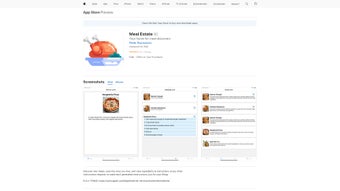
Meal Genius App is a next‑generation, AI‑driven meal‑planning tool that works as a personal culinary assistant. Designed for Apple users, this web‑based app helps you discover new recipes, store favorite dishes, and retrieve step‑by‑step cooking instructions with a single tap. Whether you are a busy professional, a parent juggling multiple meals a day, or a culinary enthusiast looking for fresh inspiration, Meal Genius tailors suggestions to your taste, dietary restrictions, and cooking skill level. The app’s interface focuses on simplicity and minimal data access, ensuring that your personal preferences stay private while you enjoy a seamless planning experience. Available for free download with optional in‑app purchases, Meal Genius offers a blend of convenience, personalization, and intelligent automation that sets it apart from generic recipe collections.
Key Features That Make Meal Genius Stand Out
- AI‑Powered Meal Suggestions: The built‑in algorithm analyses your past selections, dietary preferences, and seasonal ingredients to propose meals that match your lifestyle.
- Custom Request Engine: Type a specific request—like “quick vegan dinner for two” or “gluten‑free kid‑friendly lunch”—and receive instantly curated recipes.
- Smart Grocery List: Each recipe automatically adds required ingredients to a dynamic shopping list that can be edited, reordered, or synced with Apple Notes.
- Step‑by‑Step Instructions: Visual and text guides break down cooking processes, with timers and voice‑over options for hands‑free navigation.
- Meal Calendar Integration: Drag and drop meals onto your native iOS Calendar, allowing you to see weekly plans at a glance.
- Family Sharing Mode: Create sub‑profiles for children (age 4+) or partners, letting each user receive age‑appropriate suggestions while preserving the master plan.
- Offline Access: Download recipes and grocery lists for use when you’re without an internet connection.
- Secure Data Handling: Minimal data collection, end‑to‑end encryption, and no third‑party advertising trackers.
- Regular Updates: Monthly content drops add seasonal recipes, new dietary filters, and UI enhancements.
How to Install and Get the Most Out of Meal Genius
Step‑by‑Step Installation
- Open the App Store on your iPhone, iPad, or Mac.
- Search for “Meal Genius” and tap the Get button – the download is free.
- Once installed, launch the app and allow push notifications (optional but recommended for meal reminders).
- Sign in with your Apple ID or create a lightweight Meal Genius account using an email address.
- Complete the brief onboarding questionnaire that asks about cuisine preferences, allergies, and typical cooking time.
First‑Run Usage Tips
After onboarding, the home screen presents a personalized “Today’s Menu” based on your input. Tap any recipe to view the full ingredient list and cooking steps. Use the +Add to Calendar button to schedule the meal, and the Save to Favorites star to keep it in your personal library. The Smart Grocery List automatically aggregates ingredients from all saved meals; you can edit quantities or remove items you already have at home.
For power users, explore the Custom Request field at the top of the screen. Type natural‑language queries like “low‑carb breakfast for a 30‑minute prep” and watch the AI generate three to five tailored options. Each suggestion includes nutritional information, cooking difficulty, and a quick‑view summary.
To keep the app running smoothly, enable automatic updates in your device settings. Meal Genius pushes new recipes and feature tweaks silently in the background, ensuring you always have the latest culinary intelligence without manual intervention.
Device Compatibility, Pros, and Cons
Meal Genius is built for the Apple ecosystem. It runs natively on iOS 14 or later, iPadOS 14+, and macOS 11 (Big Sur) or newer. The web‑app version can be accessed via Safari on any Apple device, and the responsive design ensures a consistent experience whether you’re on a 12‑inch iPad Mini or a 27‑inch iMac.
Pros
- Highly personalized meal recommendations powered by AI.
- Intuitive UI that requires minimal learning curve.
- Comprehensive grocery list that syncs across devices.
- Family sharing profiles for kids and partners.
- Offline functionality for cooking without internet.
- Free to download with transparent in‑app purchase options.
- Strong privacy stance with limited data collection.
Cons
- Only available on Apple platforms – no Android or Windows version.
- Advanced dietary filters (e.g., keto, paleo) require a premium subscription.
- Initial onboarding questionnaire may feel lengthy for casual users.
- Voice‑over instructions are only available in English.
- Occasional sync delays when switching between iOS and macOS.
Overall Rating: 4.5/5 – Meal Genius delivers a smart, user‑friendly experience that simplifies everyday cooking, especially for families and health‑conscious individuals.
Frequently Asked Questions
Is Meal Genius really free?
Yes, the core app is free to download and use. Premium features like advanced diet filters, exclusive recipe packs, and ad‑free experience are offered via optional in‑app purchases.
Can I use Meal Genius without an internet connection?
Absolutely. Once a recipe is downloaded, all instructions, ingredients, and timers are available offline. The grocery list also syncs locally, so you can shop without Wi‑Fi.
How does the app protect my personal data?
Meal Genius follows Apple’s privacy guidelines, storing only essential preferences on the device. Any cloud sync is encrypted end‑to‑end, and the app does not sell data to third parties.
Is the app suitable for children?
Yes. The app supports user profiles for children aged four and above, providing age‑appropriate recipes and a simplified interface that encourages safe kitchen participation.
Will Meal Genius integrate with other health apps?
Future updates are slated to include Apple HealthKit integration, allowing you to log nutritional data directly from Meal Genius into your health dashboard.
Final Verdict – Should You Download Meal Genius?
Meal Genius brings the power of AI to everyday cooking, transforming a routine task into an engaging, personalized experience. Its seamless integration with the Apple ecosystem, robust grocery‑list features, and family‑friendly design make it an excellent choice for anyone looking to simplify meal planning without sacrificing creativity. While the lack of Android support limits its reach, the free core offering is more than sufficient for most users, and the optional premium upgrades are reasonably priced. If you value convenience, privacy, and a dash of culinary inspiration, click the download button now and let Meal Genius become your trusted kitchen companion.



.png)



